
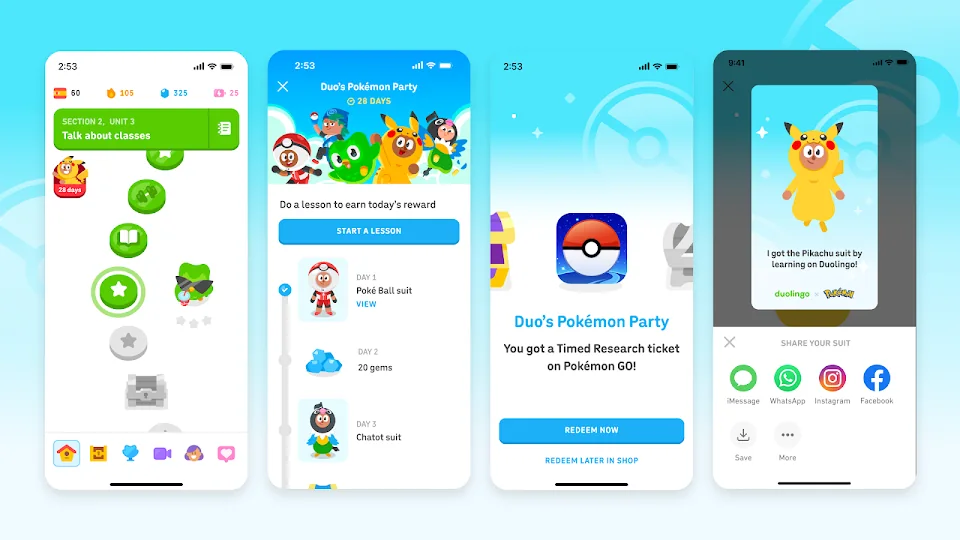
01 Completed 7 Lessons, But Progress Is Stuck on Day 1
Symptom: You finished 7 or more lessons in Duolingo today, but the "Duo's Pokémon Party" tracker still shows 1/7 days.
Official Rule: The challenge tracks separate calendar days, not total lessons completed. Doing 10 lessons on Monday only credits Day 1.
How to Fix: Complete at least one lesson per calendar day across 7 different days before December 29, 2026, at 11:59 PM local time. Because the event ends on Dec 29, the absolute latest day to complete Day 1 is December 23, 2026 (provided you opted in by December 21).
02 "Duo's Pokémon Party" Banner Is Missing in Duolingo
Symptom: You opened the Duolingo Quests tab, but the Pokémon GO crossover invitation does not appear.
- Check the Opt-in Deadline: Enrollment closes on December 21, 2026, at 11:59 PM local time. If that date has passed in your time zone, new accounts can no longer join.
- Update the Duolingo App: Visit the iOS App Store or Google Play Store and update Duolingo to the latest version, then force-close and relaunch the app.
- Check Classroom / Privacy Restrictions: Duolingo accounts enrolled in restricted Duolingo for Schools classrooms or with social/promotional features disabled in Privacy Settings may not display third-party crossover quests. If the banner is still missing, check with Duolingo support rather than changing a school's restrictions.
03 No Promo Code Box Inside the Pokémon GO App (iOS & Android)
Symptom: You unlocked your 7-day code in Duolingo, opened the in-game Pokémon GO Shop, and cannot find a text box to paste the code.
Why It Happens: Promo code entry is disabled inside the iOS Pokémon GO app (and moved out of the standard in-game shop flow). All codes must be redeemed through the browser-based Pokémon GO Web Store.
- Copy your promo code from the Duolingo app.
- Open your mobile or desktop browser and go to store.pokemongo.com/offer-redemption.
- Sign in using the same supported login method tied to your active Pokémon GO trainer profile. Check the trainer shown before applying the code. If your usual sign-in provider is unavailable, follow Niantic's offer-code sign-in guidance.
- Paste the code and tap Apply. Check the redemption confirmation, then reopen Pokémon GO to find the Timed Research.
04 Web Store Says "Invalid Code" or Timed Research Does Not Appear
Symptom: The Web Store rejects your code, or it accepts the code but no Timed Research appears in Pokémon GO.
- Verify Account Match: Open Pokémon GO › Settings › Account and verify the linked account matches the trainer logged into the Web Store. Redeeming on an accidental secondary Google or Apple login binds the code to the wrong account. Also check for copied spaces and whether the single-use code was already redeemed.
- Restart Pokémon GO: If the game was running in the background during Web Store redemption, force-close Pokémon GO and reopen it. Check the Events (binoculars) tab on the far left—not the Special Research tab.
- Check the Dec 31 Expiry: The Timed Research expires on December 31, 2026, at 11:59 PM local time. Once that cutoff has passed (January 1 locally), you cannot complete or claim the expired research. Redeem promptly after Day 7 and claim every encounter before the cutoff.
Need all four deadlines or a latest-start check? Open the full Duolingo collab guide and deadline tracker →
05 Warning: Online "Duolingo Code Generators" Are Scams
Symptom: TikTok videos or third-party sites claim to generate instant Pokémon GO x Duolingo promo codes without doing the 7-day streak.
LootRundown Fact-Check: Every Duolingo promo code is uniquely generated inside the Duolingo app after 7 separate calendar days of lessons and can only be redeemed once. "Instant code generators" or sites asking for your Pokémon GO login credentials are phishing scams. Claim your own code in Duolingo and redeem only on the official Pokémon GO Web Store.